Evaluating Corporate Letterhead: Design Standards, Technical Specs, and Practical Alternatives
A corporate letterhead serves as the foundational visual anchor for business communication, distinguishing official correspondence from generic documents. While digital communication dominates modern workflows, the need for a structured, professional document template remains critical for contracts, invoices, formal notices, and educational communications. When evaluating resources for creating a corporate letterhead, professionals must distinguish between superficial aesthetics and functional design systems that support brand consistency across print and digital mediums.
The distinction of a true corporate letterhead lies in its adherence to specific production standards and its role within a broader brand identity system. Unlike a simple header image inserted into a word processor, a professionally designed letterhead template accounts for physical printing constraints, color accuracy, and typographic hierarchy. For organizations in education and business sectors, where trust and clarity are paramount, the choice between a premium vector-based template and a basic office suite solution often dictates the perceived professionalism of the organization.
Technical Specifications vs. Generic Office Templates
When comparing design resources, the technical foundation is the primary differentiator. Many users attempt to create letterheads directly in Microsoft Word or Google Docs. While accessible, these tools lack precise control over print production variables. A dedicated corporate letterhead resource designed in Adobe Illustrator offers distinct advantages regarding output quality and file integrity.
- Resolution and Clarity: Professional templates are typically constructed at 300 DPI (Dots Per Inch). This resolution ensures that text remains crisp and logos appear sharp when printed. In contrast, standard office templates often rely on screen-resolution assets (72-96 DPI), which can result in pixelated edges and blurry typography on physical paper.
- Color Management: Corporate branding requires exact color matching. Vector-based templates utilize CMYK color profiles specifically calibrated for commercial and office printing. This prevents the unexpected color shifts that occur when converting RGB screen colors to print ink. Templates supporting 5-color setups allow for the inclusion of spot colors or specialized varnishes, offering a tactile premium feel that standard digital designs cannot replicate.
- Bleed and Safe Zones: A critical specification often missing from amateur designs is the bleed area. A proper A4 letterhead template (8.27 x 11.69 inches) includes a 0.125-inch bleed. This extra margin ensures that background colors or edge-to-edge elements extend beyond the trim line, preventing unsightly white borders after cutting. Understanding this specification is essential for anyone planning to mass-produce stationery.
For decision-makers, the tradeoff is clear: office suite templates offer speed and zero learning curve but sacrifice print fidelity. Vector-based EPS or AI files require compatible software and basic design knowledge but guarantee professional-grade results suitable for high-stakes business environments.
Assessing Fit for Education and Business Sectors
The utility of a minimal, clean corporate letterhead varies significantly by industry. While creative agencies may opt for bold, experimental layouts, the education and corporate business sectors generally benefit from restraint and structure. Evaluating whether a specific template fits your organizational needs requires analyzing the balance between whitespace and information density.
In educational contexts, letterheads must accommodate varying content lengths, from brief administrative notes to detailed departmental reports. A minimal design approach prioritizes readability and ensures that the stationery does not compete with the content. Templates featuring organized layers and ample negative space allow administrators to customize the layout without breaking the visual grid. This flexibility is crucial when the same letterhead must serve a university president, a faculty member, and a financial aid officer.
Conversely, corporate entities often require letterheads that reinforce authority and stability. Here, the "clean eye-catchy" aesthetic functions as a subtle signal of competence. The evaluation criteria should focus on how well the template integrates mandatory legal disclaimers, certification marks, and contact hierarchies without appearing cluttered. If a template forces you to shrink font sizes below 10pt to fit required information, it is likely ill-suited for corporate compliance standards, regardless of its visual appeal.
Customization Workflow and Asset Management
The long-term value of a corporate letterhead template depends heavily on editability. When researching options, examine the file structure and included assets rather than just the preview image. A well-organized Adobe Illustrator file separates static elements (like background patterns) from dynamic content (like logos and addresses) using distinct layers.
Effective customization involves more than swapping a logo. Consider the following factors during evaluation:
- Font Licensing and Availability: Premium templates often include font info or free font alternatives. Verify whether the typefaces used are open-source or require separate licensing for commercial use. Relying on obscure paid fonts can create future bottlenecks if staff members lack access to the original files.
- Vector Scalability: Ensure all graphical elements are true vectors. Rasterized effects or embedded JPEGs within an EPS file limit future resizing and editing. True vector paths allow for infinite scaling and easy recoloring to match updated brand guidelines.
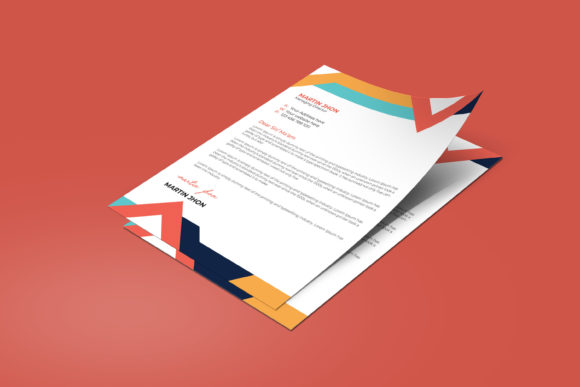
- Mockup Utility: Included 3D mockups serve a vital purpose beyond presentation. They allow stakeholders to visualize how the letterhead interacts with paper texture and lighting before committing to a print run. This step reduces the risk of approving a design that looks excellent on screen but fails in physical form.
If your team lacks access to Adobe Illustrator CC 2022 or later, verify backward compatibility or consider PDF-editable alternatives. However, for organizations anticipating frequent rebrands or multiple departmental variations, investing in the native source file provides superior lifecycle management.
Comparing Formats: EPS, PDF, and JPG
Understanding the included file formats helps determine if a resource aligns with your current workflow. Each format serves a distinct function in the corporate letterhead ecosystem.
Adobe Illustrator (AI/EPS): These are master files intended for deep editing. They preserve layers, typography, and vector data. This is the only format suitable for changing core design elements, adjusting bleed, or modifying color profiles. If you anticipate any structural changes, this format is non-negotiable.
PDF: High-resolution PDFs act as a bridge between design and print. They lock in formatting while remaining universally viewable. For many businesses, a print-ready PDF is sufficient for sending to vendors or using as a background layer in word processing software. However, editing text in a PDF is limited compared to native vector files.
JPG: Raster images are useful solely for digital previews, email signatures, or web placeholders. They should never be used for professional printing due to compression artifacts and resolution limits. Including JPGs in a template package is primarily for convenience in non-design contexts.
When comparing products, prioritize those offering the full spectrum of formats. Resources providing only flattened images or locked PDFs may suffice for one-off personal use but fail as scalable corporate assets.
Decision Factors: When to Choose Professional Templates
Selecting the right corporate letterhead resource is ultimately a calculation of time, budget, and brand maturity. There are scenarios where a downloadable template is the optimal choice, and others where alternative approaches are superior.
Choose a Template When:
- You have established brand colors and logos but lack an in-house designer to build a print-ready layout from scratch.
- You need immediate consistency across multiple departments or locations.
- Your budget precludes hiring a bespoke branding agency, yet you require higher quality than free online generators provide.
- You possess basic proficiency in vector editing software or have access to someone who does.
Consider Alternatives When:
- Your organization has complex regulatory requirements for document formatting that standard templates cannot accommodate.
- You require seamless integration with automated document generation software (e.g., CRM or ERP systems) that demands specific coding or XML tagging.
- Your brand identity is currently undefined; applying a polished letterhead to an undeveloped brand creates a disjointed experience. Invest in logo and identity development first.
- You exclusively communicate digitally and have no foreseeable need for physical printing. In this case, a responsive HTML email template or digital document theme may offer better ROI than a print-focused CMYK design.
Evaluating Long-Term Usability
The final consideration in selecting a corporate letterhead is future-proofing. Design trends shift, but business stationery should remain stable for years. Minimalist designs with strong typographic foundations tend to age better than those relying on trendy gradients or decorative illustrations. When reviewing highlights such as "Last Version Used Adobe Illustrator CC 2022," interpret this as a sign of modern compatibility but also check for legacy support if your organization uses older software.
Furthermore, assess the organization of the file itself. Well-organized layers labeled clearly (e.g., "Logo," "Contact Info," "Background," "Guides") reduce onboarding time for new staff or external freelancers. A chaotic file structure negates the efficiency gains of using a template. Ultimately, the best corporate letterhead is one that balances immediate visual impact with enduring practical utility, serving as a reliable tool for communication rather than just a decorative element.